Vidrio

Holographic screencasting app for Mac. Free for COVID-19

4 followers

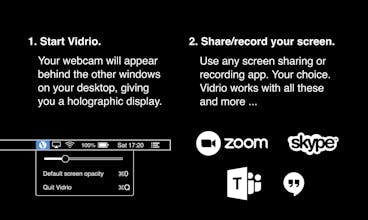
Vidrio puts your webcam stream behind your windows. Then share or record your screen — suddenly, your holographic screen floats between you and your audience. You gesture with your hand, and their heads follow. Vidrio makes effortlessly engaging screencasts.
Vidrio gallery image
Launch Team
Webflow | AI site builder
Start fast. Build right.
Promoted

What do you think? …

Danny Cohen
@james_fisher2 this is awesome. Anyway to sign up for notification when ready for windows?
Jim Fisher
@danny_cohen1 you just did! 😄 I can let you know here when I release something. Or follow https://twitter.com/vidrioapp. But yeah, I should add a proper newsletter/mailing list ...
vayare Lord Come
Very good im waiting you im my website https://vayare.ir
Rammohan Bhoopalan
@james_fisher2 how do I turn it off?
Steve Adams
@james_fisher2 @rammness - select Pause from the menu bar option.
Ayoola John
I love Vidrio! Is it possible to switch the screen that has the Vidrio overlay if I have a multi screen desktop setup?
Steve Adams
I see that there is the ability to choose a camera. I am using EpocCam (to use my phone as the webcam) but do not see it as a choice. Am I doing something wrong, or is this not a possible combination? Like the app though. I’m using it on a large screen (iMac) and I’m not sure if the perspective is right as the finger pointing is way off and takes some getting used to!!
Malora Nightingale
Excited to try this for my business. Would be cool if you some how could create an app that links your mobile device to the program as well and add an enabling feature that allows the presenter to switch between mobile and desktop devices. Sometimes there are certain things I prefer to do with my phone rather than the laptop. Overall looks great and am thinking of creative ways to implement it. Thank you. : )