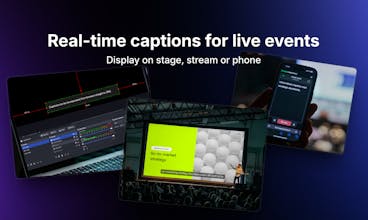
Professional captioning software for live events. Stage Captions delivers production-ready live transcription for conferences, hybrid events, and broadcasts - accessible in seconds from any browser.
Unblocked AI Code Review — High-signal comments based on your team's context
High-signal comments based on your team's context
Promoted
Love that this is framed around real events, not just recordings, @martinc1@jarekavi
From an accessibility standpoint, I’m curious how you’re thinking about scale. For large conferences with thousands of viewers across devices, are captions pushed via a central stream or rendered client-side per device?
Also wondering if you’ve explored multilingual captioning live, or if accuracy at scale is still the primary focus.
Large conferences with thousands of viewers - our server is built to handle that scale. Each client connects to our API via WebSocket connection, which gives us control over how many viewers can join a room to keep things stable. We obviously have safety limits from security and reliability perspective, but if an organizer needs higher capacity - we can expand.
Multilingual captioning: great feature request. We actually had an MVP of it, but the accuracy didn’t meet our standards and expectations. Live translation requires more context, which means that word-by-word results tend to constantly change on screen, which can be distracting. So for now, we have dropped this idea (might come back to it though).
Thanks for the genuine interest and such targeted questions!
Report
Love the origin story; building it because you actually needed it shows in the simplicity. The browser first approach feels especially event friendly, no downloads and no friction for attendees is huge. I’m curious, when you used it at the medical conference, what moment made you think, ‘Okay, this really works’? Was it attendee adoption, AV team setup, or something else?
@copywizard for me there were several such moments:
The setup took us around 20 minutes. The AV team gave us direct audio output from all microphones via a single XLR cable into our Focusrite interface. We plugged it into a laptop, opened Stage Captions in the browser, joined the room and it just worked!
The second moment was realizing we could leave it running independently. We went for a longer coffee break to talk to people and checked on our phones - everything was still running smoothly without any interaction. That independence felt great 💯
And of course the feedback from attendees. People were surprised by speed and accuracy of the captions. This kind of acknowledgement from others made it all worth it 🤘
@adam_lab yes, we support custom dictionaries as well. Users can create a dictionary by selecting the language and adding industry-specific terms. Later while creating a "room" they can select created dictionary from the dropdown. Thanks for raising such an important question! :)
Report
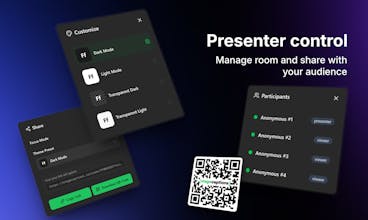
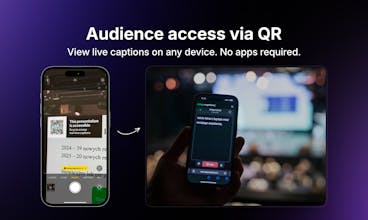
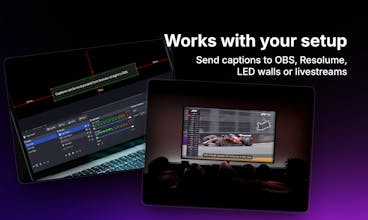
Custom dictionaries in Stage Captions sold me. Every ASR tool chokes on domain jargon, especially at medical or technical conferences where half the terms aren't in the default model. Being able to preload terminology before the event starts is the difference between usable captions and a garbled mess. The QR code viewer approach is smart too... no app install means the accessibility feature actually gets used instead of sitting in a setup guide nobody reads. Sub-second latency on browser output to OBS and Resolume is a nice touch for production teams already running those stacks.
Report
This is a smart idea - you should work on partnerships, because it would enhance the viewing experience in a big way. Is this the route you're going on?





Love that this is framed around real events, not just recordings, @martinc1 @jarekavi
From an accessibility standpoint, I’m curious how you’re thinking about scale. For large conferences with thousands of viewers across devices, are captions pushed via a central stream or rendered client-side per device?
Also wondering if you’ve explored multilingual captioning live, or if accuracy at scale is still the primary focus.
Clean execution. Congrats to the team.
stagecaptions.io
@martinc1 @virajmahajan22 very good points :) I'll try to address them:
Large conferences with thousands of viewers - our server is built to handle that scale. Each client connects to our API via WebSocket connection, which gives us control over how many viewers can join a room to keep things stable. We obviously have safety limits from security and reliability perspective, but if an organizer needs higher capacity - we can expand.
Multilingual captioning: great feature request. We actually had an MVP of it, but the accuracy didn’t meet our standards and expectations. Live translation requires more context, which means that word-by-word results tend to constantly change on screen, which can be distracting. So for now, we have dropped this idea (might come back to it though).
Thanks for the genuine interest and such targeted questions!
Love the origin story; building it because you actually needed it shows in the simplicity. The browser first approach feels especially event friendly, no downloads and no friction for attendees is huge. I’m curious, when you used it at the medical conference, what moment made you think, ‘Okay, this really works’? Was it attendee adoption, AV team setup, or something else?
stagecaptions.io
@copywizard for me there were several such moments:
The setup took us around 20 minutes. The AV team gave us direct audio output from all microphones via a single XLR cable into our Focusrite interface. We plugged it into a laptop, opened Stage Captions in the browser, joined the room and it just worked!
The second moment was realizing we could leave it running independently. We went for a longer coffee break to talk to people and checked on our phones - everything was still running smoothly without any interaction. That independence felt great 💯
And of course the feedback from attendees. People were surprised by speed and accuracy of the captions. This kind of acknowledgement from others made it all worth it 🤘
Migma AI
Real-time captioning for live events solves a huge accessibility gap!
How do you handle technical jargon or industry-specific terms during live transcription? Can speakers pre-load a custom vocabulary?
Important work!
stagecaptions.io
@adam_lab yes, we support custom dictionaries as well. Users can create a dictionary by selecting the language and adding industry-specific terms. Later while creating a "room" they can select created dictionary from the dropdown. Thanks for raising such an important question! :)
Custom dictionaries in Stage Captions sold me. Every ASR tool chokes on domain jargon, especially at medical or technical conferences where half the terms aren't in the default model. Being able to preload terminology before the event starts is the difference between usable captions and a garbled mess. The QR code viewer approach is smart too... no app install means the accessibility feature actually gets used instead of sitting in a setup guide nobody reads. Sub-second latency on browser output to OBS and Resolume is a nice touch for production teams already running those stacks.
This is a smart idea - you should work on partnerships, because it would enhance the viewing experience in a big way. Is this the route you're going on?