
Launched this week

PopAir
Your All-in-one AI Copilot for MacOS
72 followers
Your All-in-one AI Copilot for MacOS
72 followers
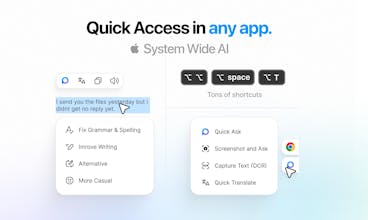
PopAir is the native macOS AI powerhouse built for speed and seamless integration. Using SwiftUI for 5x less RAM, it brings the world’s best models into one experience. • Unified Hub: GPT, Claude, Gemini & DeepSeek in one place. • Image Studio: Generate, edit, and upscale instantly. • Smart Meetings: One-click recording, transcription, and AI summaries. • System-wide: Instant OCR, translation, and rewriting via the Magic Panel (⌥⌥). One subscription. The AI superpower your Mac.








PopAir
@hasanaydins SwiftUI over Electron matters more now than two years ago. AI tools already compete for RAM and GPU, so a menu bar assistant shipping Chromium is fighting your actual workload for resources. The double-option-key trigger on selected text is where PopAir pulls ahead of Raycast AI and BoltAI. Those tools are solid but they context-switch you into a separate panel. Acting on text in-place without leaving your app is a bigger deal than it sounds.
PopAir
@piroune_balachandran Spot on, Piroune! You hit the nail on the head regarding the native vs. wrapper debate.
Since PopAir is built with SwiftUI, it stays lightweight and doesn't fight for system resources. When running heavy AI workflows, the last thing a user needs is a menu bar app hogging RAM.
My main goal with the double-tap trigger was to eliminate context switching. Acting on text in-place keeps you in the flow state, which is the core DNA of PopAir. I'm glad to see these architectural choices resonating with you! 🚀
An AI assistant for my entire Mac workflow? I'm sold. Want to dive in immediately!
PopAir
@misha___mavrin Thank you Misha!
Congrats on the launch! Treating AI as a native system layer instead of a separate app feels like the right direction for macOS. How do you think about managing context boundaries, especially when PopAir can see active windows, so actions stay helpful and precise without pulling in too much or the wrong context?
PopAir
@vik_sh Thank you, Viktor. Managing context boundaries is indeed the 'secret sauce' for making a tool like this feel truly native.
I use a hybrid approach to keep the context clean and precise:
For Browsers: If the active window is a web page, PopAir (via the browser extension) parses the content, strips away the noise (ads, menus, etc.), and converts only the relevant data into Markdown. This ensures the AI gets a clean, semantic structure to work with.
For Native Apps: When dealing with other macOS applications, we use vision-based context by capturing the active window. This allows the model to 'see' the UI and content just as the user does, providing help based on the visual context.
By switching between structured Markdown and visual data depending on the environment, we maximize precision and prevent irrelevant 'noise' from polluting the session.
multi-model switching is what i need - different models for different tasks. can you set defaults per app?