

DevScribe is a next-gen productivity tool for developers, architects, and tech writers. It unifies docs, code, and design in one offline workspace—helping you focus and build faster. Your data stays 100% safe and stored only on your system.
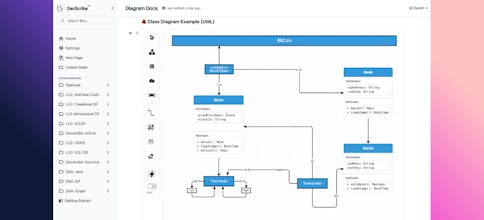


Devscribe is a game-changer for software engineers! It brings everything into one beautiful workspace — documentation, system architecture (HLD/LLD), API documentation, ERDs, data structure visualization, and even code execution for Java, JavaScript, TypeScript, and SQL. No more switching between Notion + Draw.io + VS Code + Postman. It’s clean, fast, offline-friendly, and built purely to support the developer community.
Exactly the tool we always wished existed!
✅ All-in-one developer workflow
✅ Offline support
✅ Multiple docs & diagrams in one place
✅ Code execution inside the same app
✅ Perfect for engineering teams & system design practice
✅ Database + data structure visuals are a huge plus
It would be great if users could use each feature as a standalone tool as well — like API documentation editor separately, or code execution as an independent playground.
A cloud sync option and collaboration features in the future would make Devscribe even more powerful!
✨ Wishlist
Modular tools (use Docs / API Docs / Code / Diagrams separately)
Live collaboration (like Google Docs / Notion)
More languages support for code runner
AI suggestions for documentation & diagrams
I chose Devscribe because it finally puts docs, diagrams, and code in one place. No more switching between five tools for one project.
Offline mode is a core philosophy of Devscribe.
Everything — docs, diagrams, API docs, database visualization, and code execution — works fully offline, right on your machine.
No cloud dependency. No internet required.
Your data stays secure and local, which is perfect for
✅ enterprises
✅ security-conscious teams
✅ developers working on the go
Absolutely. Devscribe includes pre-built templates for:
HLDs & LLDs
API documentation
Class diagrams & ERDs
Data structure visualization
Code snippets (Java, JS, TypeScript, SQL, Shell)
Plus, reusable components and code snippets accelerate documentation and prototyping. More templates are added frequently based on community needs.
Yes! Devscribe stores all your design artifacts — diagrams, docs, HLD/LLDs, API specs, database maps — in a single project structure, making versioning straightforward. You can easily connect projects to Git, so architecture and technical docs evolve alongside your code, eliminating outdated diagrams forever.
Devscribe has become my go-to workspace for system design and documentation. I love that I can:
✅ Write technical documentation
✅ Design HLDs/LLDs and system architecture diagrams
✅ Create API documentation with structure
✅ Build ERDs and database visualizations
✅ Visualize data structures for learning and interviews
✅ Run and test Java, JavaScript, TypeScript, SQL, and Shell code snippets
✅ Work completely offline
It genuinely replaces 4–6 different tools I used daily — and keeps everything organized in one project.
The UI is clean, fast, and clearly built with developers in mind.
This is the kind of tool I wish I had during college and in professional system design reviews!
A few things I hope to see as the product evolves:
✨ Ability to use each feature as a standalone mini-tool (e.g., only API docs or only code runner)
✨ Cloud sync and shared collaboration for teams
✨ More languages for the code runner
✨ Export options for diagrams to SVG/PDF
But overall — a game-changing product with massive potential.
Excited to see where Devscribe goes from here 🚀
It saves me hours every week. Devscribe keeps everything in one project so nothing becomes outdated or disconnected later.
Devscribe is designed to eliminate context switching. You can move between documentation, HLD/LLD diagrams, API specs, code execution, ERDs, and visualizations instantly — within the same editor window.
Everything stays synced to a single project, so you never lose track of what belongs together.
It feels like one continuous workflow, instead of juggling multiple apps.
Yes — Devscribe runs code snippets directly inside the app for:
✅ Java
✅ JavaScript
✅ TypeScript
✅ SQL
✅ Shell
Developers can also adjust execution settings, customize inputs, and expand the sandbox support as needed.
It’s perfect for testing logic, validating API examples, or embedding runnable demos inside your documentation.
Offline-first is a core principle.
When you use Devscribe offline:
✅ No cloud dependencies
✅ No background network requests
✅ No telemetry transmitted
✅ All data saved locally, private to the user
Your code, architecture, and documentation never leave your machine unless you choose to sync or export.
DevScribe is a game-changer for developers and tech writers. I use it to plan architectures, document APIs, and run quick code tests — all without leaving one workspace. The offline setup is a huge plus; everything stays on my Mac, so I never worry about privacy or cloud sync issues. The built-in diagram and code execution tools make it super easy to move from idea to implementation in minutes.
I’d love to see more ready-to-use templates for specific workflows (like backend service design or API specs) and maybe an option for optional cloud backup in the future. But overall, it’s an incredible productivity tool that feels built by developers, for developers.
After trying multiple tools for docs, code, and design, nothing felt truly built for developers who work locally. DevScribe stood out because it’s clean, fast, and made by someone who clearly understands developer workflows. It’s rare to find a productivity tool that works entirely offline without sacrificing modern features.
Yes, DevScribe provides quick and reliable search across all your local content — including code, documents, and diagrams. It indexes your projects locally, allowing you to instantly find any function, file, or note without needing an internet connection. The search is optimized for speed and context, so you can navigate complex projects with ease.
Privacy is at the core of DevScribe’s design. All your work — code, documents, and diagrams — is stored locally on your computer with no cloud dependencies. There are zero server connections, ensuring that your data never leaves your device. DevScribe uses secure local storage principles and OS-level encryption support, giving you full control over your information and complete peace of mind.
DevScribe offers a fast, distraction-free editor designed specifically for developers. It includes intelligent autocomplete, syntax highlighting, and real-time linting for supported languages like Java, JavaScript, and TypeScript. Inline documentation and instant feedback help you write and debug faster — all within a clean, offline workspace that feels lightweight yet powerful.
Hey everyone 👋
I'm Avinash, and I’ve been building DevScribe solo for the past 1.5 years — a unified desktop editor for developers who want to design, code, and document everything in one place.
Before working on projects, I struggled with constantly switching between multiple tools — Notion or Confluence for documentation, Postman for APIs, and separate apps for creating UMLs or database diagrams. Even when practicing DSA, I had to jump across platforms just to keep notes and code together.
So I decided to build DevScribe — an offline, all-in-one workspace where you can:
Write documentation and technical notes
Design HLDs, LLDs, UML, and database ERDs
Document and test APIs directly
Run code in Java, JavaScript, TypeScript, Shell, and SQL
Everything stays within your system — no servers, no uploads. Your data is 100% safe, private, and accessible even when you’re offline.
DevScribe is built to empower developers, architects, and tech enthusiasts to focus, create, and collaborate — without tool fatigue.
🌐 https://devscribe.app
Would love your feedback and suggestions!
— Avinash