


A Week with Poke Review: A Promising Start for a Proactive AI Assistant

Have you used Poke? Leave your thoughts in the comment or share other AI Assistants you've used!
What is Poke?
Poke.com is a proactive AI assistant that automates your digital life with smart integrations and real-world utility. It’s like Claude via iMessage or WhatsApp that doesn’t always need a user prompt to message you.
Can an AI Assistant Finally Deliver on Its Promise?
I feel like I’ve seen countless products launch claiming to be “the” AI assistant that organizes your life, automates the boring stuff, and keeps you on top of things. But in my opinion, most fall short. They’re either too simple in what they can do, too clunky, unreliable, and almost always not as proactive as I’d like them to be.
Then came Poke.com, almost out of nowhere. After a week of hands-on use, I’m convinced Poke is the closest thing yet to a digital automated assistant that feels genuinely proactive, customizable, and lowkey fun.

Pros & Cons
Pros
Proactive automations for daily schedules, email filtering, meal planning, news digests, and more.
Deep integrations with tools like Gmail, Notion, Linear, GitHub, Vercel, Custom MCPs, and more.
Long-term memory for context-rich, ongoing conversations.
Customizable automations via instructions, Webhooks, API, or MCP.
Surprisingly human-like (at times): Sometimes it feels like an actual assistant, other times you can definitely tell it’s AI.
Cons
Aggressive onboarding “bouncer” can be off-putting for some.
Pricing is inconsistent (some get in for $3, others pay $30), which can frustrate users.
Some integrations/tools can be slow.
Still early days, so you might encounter occasional bugs and rough edges.
Design & Build
Poke’s main interface is one you’re most likely familiar with: your messaging platform of choice. You can choose from SMS, iMessage, or WhatsApp to interact with Poke and have the ability to change it later. I chose iMessage. The onboarding “bouncer” is a quirky gatekeeper that negotiates your entry price while roasting you pretty aggressively. Once inside, Poke becomes more normal and acts quite helpful.
Reflecting on my interactions with Poke, I realized that using it through iMessage made me more patient when waiting for replies. Texting is naturally asynchronous, so I didn’t expect instant responses like I might from a chatbot in an app. This messaging context also made the relationship feel more personal than with other AIs. Poke reacts to your messages, can see your iMessage reactions, understands voice notes, and works seamlessly with most iOS functions. The most basic interface provided the most intimate experience.
All your settings, automations, and connections can be adjusted via the web app, which is simple and quite well designed. The little touch of the background changing depending on the time of day is nice and gives a hint to the kind of details the team behind Poke, The Interaction Company of California, keep in mind while building.

Features & Performance
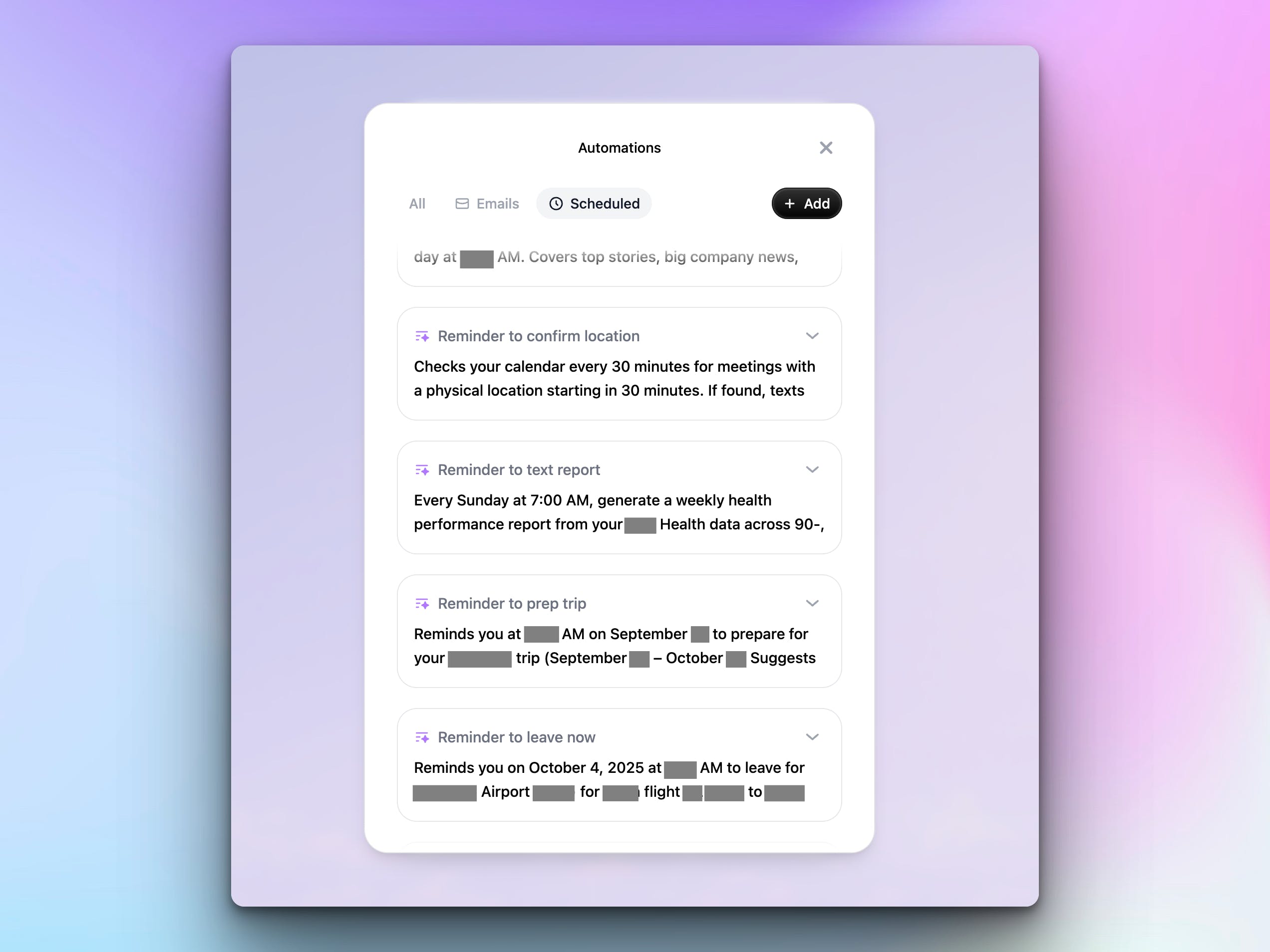
Poke’s real power lies in its proactive automations and integrations. Here are some I have set:
Daily Schedule Automation: Every morning at 8am, Poke sends me a day overview with my calendar events, surfaces important emails that need my attention, and highlights key updates relevant to my day (like notes I took for an upcoming call).
Email Filtering: Poke can notify you when important emails arrive and also when emails are from contacts/real people. It’s like a nice proactive inbox filter.
Meal Planning: I wanted daily meal plans based on my health goals, with reminders to prep ingredients before lunch…and it delivered.
News & Information Digest: I get a comprehensive daily briefing covering top news, economic movements, and tech updates from sources like X, YouTube, and Product Hunt.
Custom Integrations: Thanks to @Rube (Rube.app), @Cal.com webhooks, and even iOS Shortcuts, I built automations that fit my workflow. Like a proactive “running late” messenger to whomever I’m meeting and ability to receive cal.com notifications.
Proactive Assistant: The biggest thing is that Poke doesn’t wait for you to “open it” or “prompt it”... it just does it. It really does feel like you have an assistant texting you about your meetings, plans, and updates.
Performance is generally smooth, though some third-party integrations/MPCs can be slow. The AI’s memory is impressive, maintaining context across conversations and surfacing relevant info when you need it.
Real-World Use: My Week With Poke
After surviving the bouncer’s roast (I paid $30, but some users got in for free so haggle hard!). I almost immediately started diving into Poke’s automations. The daily schedule and news digests quickly became staples in my daily routine, surfacing things I’d otherwise miss. The email notification updates actually helped me respond to people faster since Poke can respond for me too.
I had the most fun with the custom automations. I set up a workflow where Poke checks my location before meetings and, if I’m running late, drafts and sends a reschedule email. This required a bit of tinkering, using Cloudflare Workers, iOS Shortcuts, and webhooks, but once set up, it really did feel like I had an assistant on call.
Poke’s proactive messaging, ability to adapt to your needs, and long-term context make it feel a bit more than another GPT. Just like a human would, it even suggests relevant actions and adapts as your needs evolve.
Comparisons & Alternatives
Poke.com stands out from traditional assistants like Siri, Google Assistant, or even ChatGPT-based bots in a few key ways:
Proactivity: Most assistants wait for you to ask; Poke acts on its own, based on your routines and context.
Custom Integrations: While others are limited to their ecosystems, Poke’s open approach (MCPs, API, Rube.app) means you can connect almost anything.
Community & Templates: The automation gallery and hackathon challenges encourage sharing and remixing workflows.
Alternatives:
Notion Automations: Great for workspace tasks, but less proactive and harder to set up for real-world triggers.
IFTTT/Zapier: Powerful, but less conversational and lacks the “assistant” feel.
AI Chatbots like ChatGPT, Gemini, Claude: Good for Q&A, but not for proactive, real-world automation.
Leave what you've been using in the comments!
Verdict: Who Is Poke.com For, and Is It Worth It?
If you’re someone who likes to automate your life or are in desperate need of some sort of assistant, Poke will come as a breath of fresh air. The onboarding is quirky, the automations are genuinely useful, and the customization potential is huge. It’s not perfect and some integrations need polish, but it’s the most promising AI assistant I’ve used since ChatGPT became a consumer product.
Who should try it?
Remote workers, founders, and anyone juggling multiple tools and calendars
Individuals who operate as a team of 5
Tinkerers who love building custom workflows
Anyone tired of missing important emails, messages, or scrambling for meeting prep
Is it worth it?
If you’re willing to put up with the bouncer, take a bit of time to experiment and set up a few automations, absolutely. It’s already helped me stay on top of things and I can’t wait to see how Poke evolves.

How I was greeted by the bouncer.
Replies
NewOaks AI
What data do you use to train Poke, Gabe?
Product Hunt
@ray_luan so I didn't train the actual model but it gets linked to your email(s) and it looks like it uses that as a "source" for information. I also used @Rube to give it a ton of tools and additional knowledge base.
I text it things I'd like it to remember about me or how to do things and.... it actually remembers which makes me think it also uses the chat history as a knowledge base as well.
NewOaks AI
@gabe Thanks for the details. Looks like it is using your email, chat history as main knowledge base. So long term memory is the key then?
Product Hunt
DiffSense
Wild idea! Reminds me a bit of friend.com I think this product position is very cool. An AI that is your sidekick sort of. For now, no one has really solved independence, no AI agent does well on its own, too much hand holding to get things right. But this isnt so much an issue about inteligence, I think the state of the art LLM is already there. Its more about the tooling part. So its a great time to be a maker building tools for agentic work.
Product Hunt
@sentry_co Independence is a great word to emphasize where we "want AI' to be. I think Interaction does a good job allowing the user to make the agent proactive. I don't really prompt it anymore too much.
Didn't even think about the similarities of @Friend and this - both text based interactions but that's a good point! I guess the marketed purpose is more assistant/your AI vs a "Friend"...and I'm keeping Poke that way....for now.
DiffSense
@gabe PPLX just launched email and calendar assistant yesterday?!?, that you just adhock install. So this space is definitly happening. "Silient background AI"
Cal ID
Poke feels refreshing on AI assistants, finally proactive instead of just reactive. I love that it combines long-term memory with automations, so it’s not just answering questions but actually lightening daily mental load, most companies fail to understand this simple use case.
Amazing! But how did you get it connected to MCP? Doesn't seem to work for me. The use-case is very compelling.
Product Hunt
@daniel_halsall you have to go under integrations and use a custom connection. Once there you find the streamable https way to install your MCP tool. For @Rube it's the MCP URL option.
Product Hunt
@tmtabor 100000%
@tmtabor @gabe That bouncer. ZOMG. I hope I can negotiate month 2 pricing...I feel like the bouncer hates me. But I like the speed and the responsiveness. The hackathon that ya'll did convinced me. And the MCP links...this is gonna be wild.
For me, I like poke cause it may access my personal data (like my email etc) lol, an AI who will a little bit know me.
Vartiq
Interesting tool.
Definitely still feels like working with a clever, caffeinated toddler sometimes…
Product Hunt
@lee_fuhr1 haha, it's definitely not perfect. I've gotten it pretty well trained now though!
@gabe, what have you done to train it? I've tried, but it feels like it doesn't learn…
Screen recording taken AFTER I told it above to quit repeating itself: https://lfu.hr/mCAQgeI
(I can't attach an MP4 here)
Really interesting launch 🚀. What clicked for me is how Poke flips the usual “wait for prompt” model into something proactive. Most assistants I’ve tried still feel like fancy Q&A bots — helpful, but passive.
The idea of getting a daily schedule text or even a proactive “running late” nudge feels way closer to what an actual assistant would do.
Curious though — do you see Poke evolving more as a personal life manager (meals, news, daily routines) or as a team/work assistant (projects, meetings, integrations)? Either direction could unlock a huge audience.
As a designer building with AI, I feel we’re closer than ever but the real promise is only met when assistants solve practical problems with a simple, trustworthy experience.