
Launched this week

Multitui
Sandbox claude code, codex, or any TUI on macOS
96 followers
Sandbox claude code, codex, or any TUI on macOS
96 followers
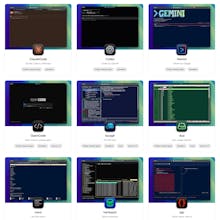
Multitui is a macOS app factory that generates individual terminal apps for TUI programs, with optional sandbox. Create dedicated native apps for claude code, codex, gemini, lazygit, harlequin, or any TUI.




Multitui
Congrats on the launch — love the sandboxed TUI app factory approach on macOS.
Multitui
@zeiki_yu Thanks! I'm thinking about adding network sandboxing to prevent code and secrets stealing, like Little Snitch, but more fine-grained.
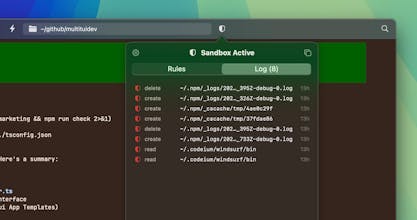
Launching ClaudeCode.app instead of claude is such a clean workflow. Seeing sandbox-exec blocks and adding rules as you go feels like the right balance. Does Multitui ship with presets like repo-only writes and no-network? Safe defaults make this easy to trust.
Multitui
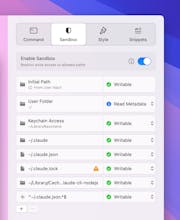
@piroune_balachandran Yes to repo-only writes... only the folder that you open has write access. By default, everything else in your user folder is invisible to claude/codex (not even read-only).
Network sandboxing is not implemented yet, but it's the next big feature. Right now, third-party network filtering apps like Little Snitch work, since you can target it as a dedicated app rather than blocking iterm2 or ghostty. I'm planning some more nuanced network sandboxing, like preventing secrets from leaking and heuristics for preventing code exfiltration.
@davidcann Repo-only writes with everything else invisible is a better default than I expected from Multitui. The exfiltration heuristics you mentioned for network sandboxing... are you thinking request-level filtering (blocking suspicious POST payloads, long query strings) or something more structural like proxying all outbound traffic through a local filter? Feels like the proxy route would pair well with the deny-log-then-allow-rule workflow you already have for filesystem access.
Multitui
@piroune_balachandran Yes, I'm thinking about proxying all outbound traffic, analyzing against the user's allowed-domain rules (option to block all except anthropic/openai/google by default?), plus analysis of the POST payloads and GET request content.
Congrats on the launch — love the idea of giving coding agents a controlled execution environment. One question from a standards/consistency perspective: how granular can the sandbox rules be? Do you allow defining reusable rule sets or patterns for file access, so the agent behaves consistently across different projects?
Multitui
@dris_keddy The rules are pretty granular and are per-app that you create, like the Claude Code app template has rules for paths that Claude Code needs (~/.claude/*, etc), then when you open a project folder, claude has write access to your project folder. This makes the Claude Code app reusable for multiple projects.
However, if you have a more complicated project with several folders, you can create an app (like ComplicatedProject.app) dedicated to just that project and very specific rules (including regex!) for that app... you would set the default working directory to `~/complicatedproject` and the command field to `claude`.
This is exactly what vibe coding needs - the sandbox approach is smart. Been seeing too many people run coding agents with full system access, not realizing what can be exfiltrated. The network sandboxing idea for preventing secrets theft would be huge. Most security issues I've seen in AI-generated code aren't runtime vulns - they're leaky APIs, hardcoded creds, or packages that phone home.
Multitui
@mykola_kondratiuk Thanks, I agree that protecting against secrets leaking will be useful and may be the best starting point for the network sandbox.
The sandbox-exec approach feels like the right level of isolation for coding agents without the overhead of containers. I especially like the log monitoring UI for observing blocked actions in real time. Does the log view support filtering or searching through past blocked events? When debugging why an agent failed mid-task, being able to quickly trace which specific file or syscall was denied would be really useful.
Multitui
@yamamoto7 The log is sorted by time and I haven't seen the list get long enough where it's difficult to find important things that were blocked, so it doesn't currently have a filter. It does open into a full window, though, so perhaps some options could be added there, like filtering and exporting the log.
Thanks for the explanation! The full window mode sounds like a good place for future features. Exporting would be great for post-mortem analysis when debugging why a long-running agent session failed.
This solves a real problem. I've been running Claude Code for months and the "just trust it" approach to file system access is... uncomfortable. Especially when you're working across multiple projects and one agent could theoretically touch files from another.
The sandbox-exec approach is smart - native macOS sandboxing without the Docker/VM overhead. How does it handle when Claude Code needs to install npm packages or run build scripts? That's usually where sandbox friction kills the workflow.